Extending the language
This section of the documentation is intended for developers interested in extending the Scientific Computing Language to other domains.
The textS language can be extended to cover other domains of scientific computing. The textM language is an extension of textS and can be used as a blueprint for creating further languages based on textS. The modularity of the grammar and of the interpreter is continuously improved so that there may be frequent changes in this section until there is a stable package structure.
Test cases (inputs)
It is strongly recommended to have a clear idea what abstractions from the new domain should be added to the language and with what language elements (such as types and operations) these will be implemented.
In the following there are two examples of extensions of the textS core language from the past.
Example 1: Extend the language to support power in numeric expressions (supposed that only multiplication is currently supported). A simple test input will be something like: a = 2 * 2; b = 2 ** 2; print(a, b).
Example 2: Extend the print statement to enable units conversion of numeric parameters. A good test input will be, for example, a = 1 [m]; print(a [cm]).
General procedure
The following steps include all changes needed to extend the language. The textS language and its supporting tools are based on textX, a tool for creating domain-specific languages and their supporting tools using Python.
Add new rules to the grammar and modify existing rules. The new grammar should be checked for correctness by parsing it and visualizing it.
Run the regression tests to ensure that the new grammar does not break existing test cases.
Parse the test input and visualize the created model.
Optional: Write functions to modify model objects and register them as either model or object processors.
Write functions to evaluate the type and the value of the new metamodel classes and register them.
Optional: Write functions to apply additional static constraints to the model and register them as either model or object processors.
Write a serializer class and a print formatter function for all new types (if any).
Integrate the test inputs into the set of regression tests.
Write a documentation of the extension.
Grammar, metamodel and model parser
Grammar
The main component of the domain-specific language is the grammar. The grammar describes the syntax of the language in a formal and machine-readable way. In textS a textX grammar is used. The developer has to familiarize themselves with the textX grammar before starting a language extension. A good tutorial section can be found here.
The textS grammar consists of a set of rules that are used to match the textual model.
Grammar version
After significant changes in grammar, the grammar version must be incremented and the new
version has to be added to compatibility.py. If the grammar changes break the compatibility
with the interpreter before the changes, then either the previous grammar versions must be removed
from compatibility.py or a compatibility layer has to be implemented for the modified rules.
Breaking changes in the grammar lead to changes in the metamodel, i.e. new classes,
removed classes or change of class attributes - names, types, default values etc. In all such
cases either the previous grammar version cannot be supported or a compatibility layer has to
be implemented. The compatibility layer can be implemented in the interpreters but better as an
object or model processor (in a sub-module in module metamodel) running before the constraints
and the interpreter.
Use of references
While any reference allowed in textX can be used (for example myref = [Variable:ID]) only reference objects of class GeneralReference are mapped to links in FireWorks workflows. Therefore, to have a working model in workflow evaluation mode, only this type of references should be used. The rules IterableProperty and IterableQuery can be used as blueprints for such uses.
Grammar location
The grammar is located in the folder src/virtmat/language/grammar where virtmat.tx is the top-level grammar file. The grammar correctness can be checked by the command
textx check src/virtmat/language/grammar/virtmat.tx
Metamodel
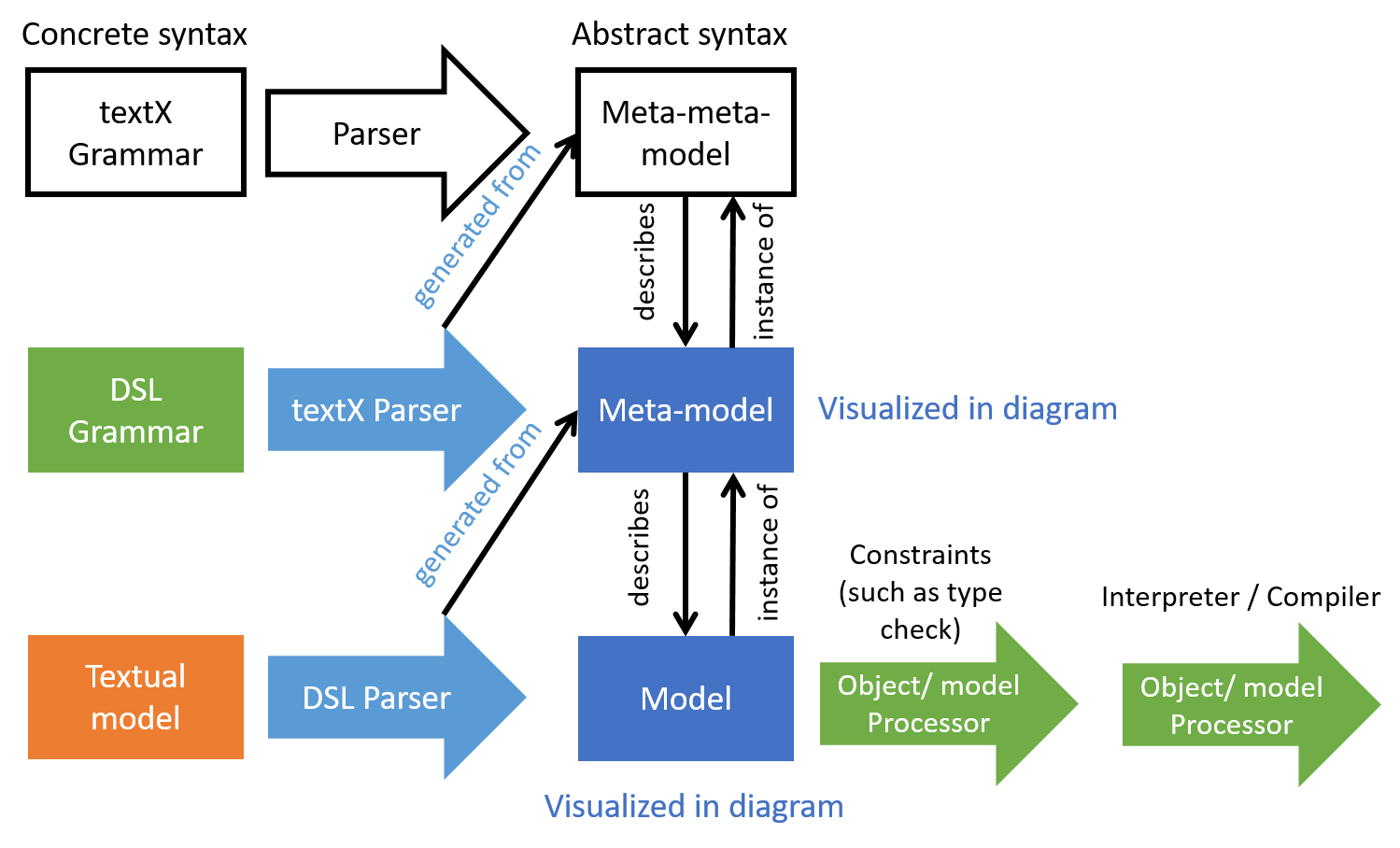
By parsing the grammar, textX creates the so-called metamodel (see Figure 1). The textX metamodel is a set of Python classes with certain relationships, for example the parent-child relationship. Another important relationship is the reference. Every common rule in the grammar is used to generate one class in the metamodel with the same name as the grammar rule. The metamodel can be visualized using the graphviz package as described here so that the metamodel classes with their attributes and relationships can be inspected.
DSL parser
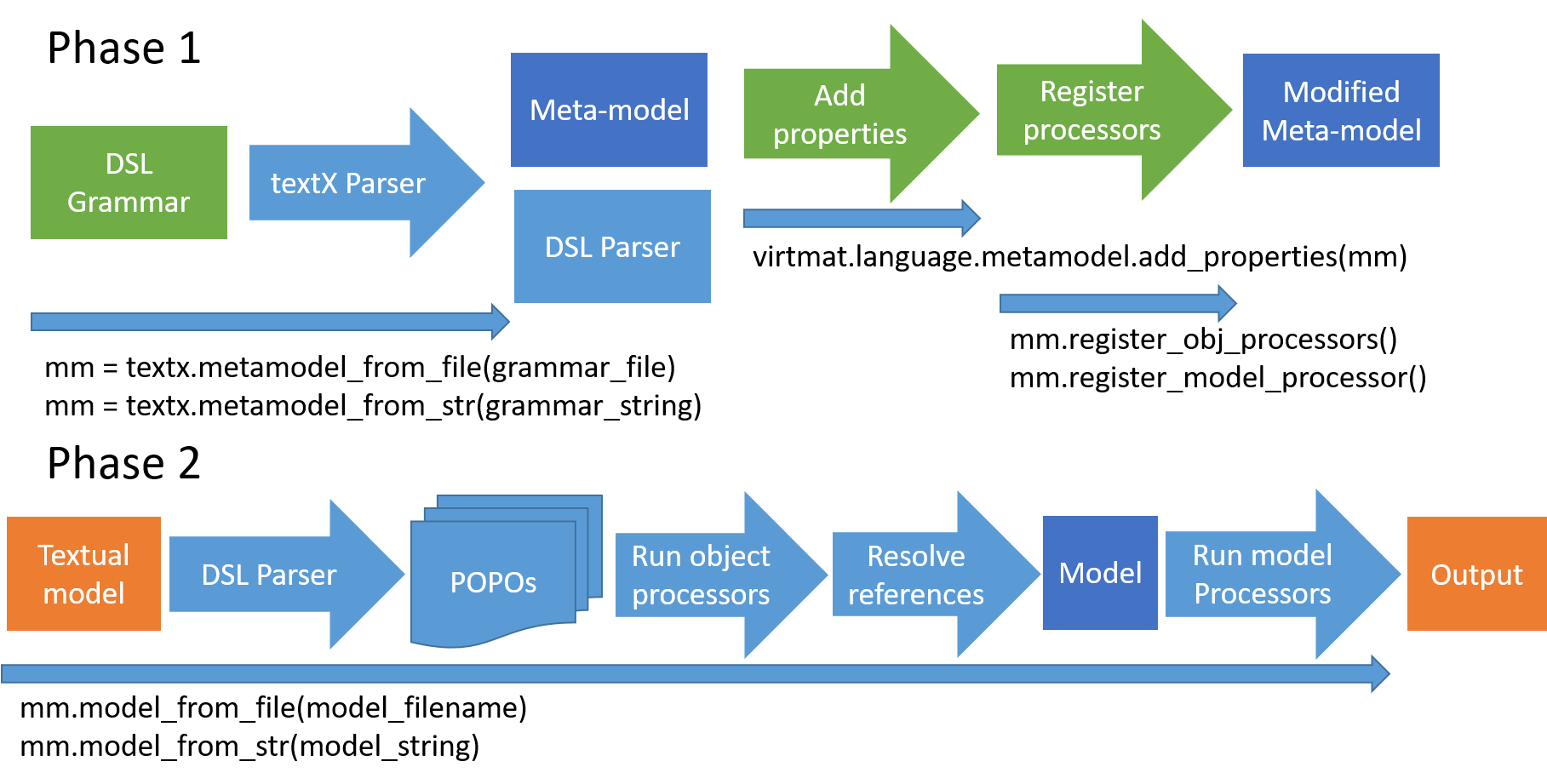
The second artifact created by parsing the grammar is the DSL parser, i.e. the code that will process a textual model written in the domain specific language. The DSL parser and the metamodel are not provided as source code but rather created in memory from the grammar on-the-fly every time a textual model is processed (see Figure 2).
Run the regression tests
Grammar extensions always require changing existing rules, e.g. extending an ordered choice rule with a newly added rule. Therefore, after checking the grammar correctness, the regression tests must be run. The regression tests are located in the top-level folder tests. The tests can be started, after changing to the test directory, with the command pytest. If any regression tests fail due to the changes in the grammar the grammar must be fixed so that all regression tests pass.
Model
Using the option --show-model of the CLI, the textual model is parsed and if parsing is successful, i.e. the textual model has valid syntax, then the abstract model (or simply the model) is created. In addition, a graphviz dot file is created with the same base name as the textual model file is created. This can be used to create e.g. a PDF file displaying the model, for example:
texts script --show-model -f series.vm
dot -Tpdf series.dot -o series.pdf
Enriching the metamodel
The generated metamodel needs certain extensions that are used within the interpreter stage. After the metamodel is instantiated after completely parsing the grammar, the properties described in the following are added to the metamodel classes by patching.
The type_ properties
Because textS is a statically typed language, every new metamodel class must have a type_ property method that evaluates and returns the Python type of a model object (instance of the metamodel class). The mapping between Python types and textS types is provided in the internal module src/virtmat/language/utilities/typemap.py. If the values of the objects of newly added metamodel classes have other types than one of the already provided types, then the type map must be extended with this new type correspondingly. An overview of the textS types is provided below.
The type methods are located in the internal module src/virtmat/language/constraints/typechecks.py.
To create types the utility function get_dtype() should be called. For basetypes, such as String and Boolean only typemap['String'] and typemap['Boolean'] should be used.
If the type of an object cannot be inferred, typemap['Any'] or typemap['Numeric'] should be used. If the object has no value attribute, then the type_ attribute is also not defined.
NOTE: None is no valid return value for type_. The type_ attribute must be an instance of Python type.
NOTE: To evaluate the type, the value property may not be used.
Using the type_ properties, static type checks are performed via a model processor running before the interpreter. Additionally, dynamic (run-time) type checks are performed after evaluation (see the value and the func properties below) of the corresponding objects. These checkers are located in src/virtmat/language/utilities/typechecks.py.
The type_.datatype attribute
The type_ property has a datatype attribute that must be either a Python type or None if the type has no datatype. Quantity, Series and Array have datatype. The DType metaclass is used to instantiate the proper type for given base type and datatype. In practice, many types are not instantiated dynamically and the get_dtype() utility function should be used instead. For example, to get the float quantity type of q_obj, the call
from virtmat.language.utilities.typemap import get_dtype
q_obj.type_ = get_dtype('Quantity', datatype='Float')
will return the proper type.
The datatypes and datalen properties
The datatypes property is a tuple containing the types, i.e. the type_ attributes of the elements, of some iterable types such as Tuple, Table, Dict or table-like types, or None for all other types. For Table types all elements in datatypes must be Series type (with their datatypes). If datatypes cannot be inferred then an empty tuple is returned.
The datalen property is None for types that have no data length. These are all scalar types, but also Tuple and Dict. The number of elements of a tuple or dictionary is implied by the length of their datatypes attribute (see above). The datalen property of Series and table-like types is a non-negative integer number (typemap['Integer']). When a scalar length cannot be inferred then datalen must be set to pandas.NA. The datalen is a tuple of positive integer numbers for arrays (analogous to the shape property of numpy arrays) and an empty tuple for array type of unknown size/shape.
The value properties
Every metamodel class, whose objects have values and have type_ attribute, must provide a value property method. These methods are located in the internal module src/virtmat/language/interpreter/instant_executor.py.
The func properties
For deferred and workflow evaluation, every class with a value property must also provide the func property method. The func property method is a Python function returning the func property that is a tuple consisting of a function returning eventually the object value (only if called) and a flat tuple of model objects whose values are used as call parameters.
The definitions of func properties are located in the internal module src/virtmat/language/interpreter/deferred_executor.py.
NOTE: Only named objects (references to variables and imported objects) are allowed as call parameters. The func property method may not use the value property. In addition, the returned function (the first tuple element) may not contain object attributes or references to other model objects (self.something).
For example, if the model object of metamodel class WeightedSum has an attribute vars that is a list of variable references of scalar numeric types and wgt is a Python numeric scalar attribute (of type int or float) then the returned tuple can be defined as:
def weighted_sum_func(self):
    wgt = self.wgt  # self not allowed
    return (lambda *x: wgt*sum(x), tuple(self.vars))
metamodel['WeightedSum'].func = property(weighted_sum_func)
Object processors
The textX object processors are useful if a constraint cannot be enforced by the grammar or a class attribute cannot be set by parsing, such as default attribute values or values implied by some convention, i.e. a specification in the input is missing. For example, a complex number with missing optional real part in the input will be an object with real part attribute that has value None. An object processor finds this and replaces None with 0.0.
The object processor is an (optional) function that allows the processing (performing checks, adding/modifying attributes etc.) the objects of a certain metamodel class. Every object processor is registered on a per-class basis in the internal module src/virtmat/language/metamodel/processors.py and run on a per-object basis as soon as an object of the class is instantiated.
Interpreter
The interpreter is implemented as a list of textX model processors. The instant and the deferred evaluation is triggered by calling the value property of the top-level model object (named Program). The workflow evaluation is triggered by calling the model processor workflow_model_processor(metamodel).
The model processors are only called within textX automatically (in the order of registration) right after the model is fully instantiated and all object processors have run.
The only needed action in this section upon language extension is to write and register relevant object and model processors.
Constraints
The purpose of constraints is to introduce semantics into the model that is not included in the grammar. For example, a circular reference cannot be prevented by grammar or in the best case such grammar will decrease parser performance significantly due to necessary and potentially very long look-aheads. Therefore, a check for a circular reference can be done more efficiently after the parsing phase, after the whole model is completely constructed. Another type of constraint is the type constraint for which the type_ property is used.
All constraints in textS are implemented as textX model processors that are registered in the internal module src/virtmat/language/metamodel/processors.py. The individual constraint processors are located in the folder src/virtmat/language/constraints and registered in the module src/virtmat/language/constraints/processors.py. One example of such constraints is to check validity of types in check_types_processor(metamodel). Other kinds of constraints are defined in the same folder and registered in the same module.
Overview of used types
In the following table, the base types in textS are listed.
Name |
Python type |
Type annotations |
Subtyped |
Has datatype |
|---|---|---|---|---|
Any |
|
|
No |
No |
String |
|
|
No |
No |
Boolean |
|
|
No |
No |
FuncType |
|
not supported |
No |
No |
Integer |
|
not supported |
No |
No |
Float |
|
not supported |
No |
No |
Complex |
|
not supported |
No |
No |
Numeric |
|
not supported |
No |
No |
Tuple |
|
|
Yes |
No |
Dict |
|
|
Yes |
No |
Table |
|
|
Yes |
No |
Quantity |
|
|
Yes |
Yes |
Series |
|
|
Yes |
Yes |
BoolArray |
|
|
Yes |
Yes |
StrArray |
|
|
Yes |
Yes |
NumArray |
|
|
Yes |
Yes |
A base type is retrieved from the typemap dictionary using its name as key, e.g.
from virtmat.language.utilities.typemap import typemap
b_obj.type_ = typemap['Boolean']
The base types Any, String, Boolean and FuncType can be used as type_ properties without subtyping. The numeric base types (Integer, Float, Complex and Numeric) cannot be used as type_ properties but can only be passed as datatype keyword argument to get_dtype() to subtype the base types Quantity, NumArray and Series. All other types are subtyped and parameterized using the get_dtype() utility function to get the proper type_ attribute. All base types listed in the table can be used as datatype attributes.
If a Python function is imported and type annotations are provided in the function call signature, then the types of the call parameters are matched to the types inferred from the annotations. The third column of the table provides the relevant accepted type annotations. The function type is not accepted because in textS a function cannot return a function and cannot accept a function as argument. Furthermore, bare numeric type, such as int, float and complex, and numpy datatypes are not accepted as types of function arguments and return types. Instead, pint.Quantity type should be used. The same holds for numpy arrays of numeric types.
Write serialization classes for new types
It can happen that for the language extension some language parameters, i.e. textX model objects with defined value property, are new types. These new types have to be added to the internal module src/virtmat/language/utilities/typemap.py and mapped to the relevant Python type (class). For the Python class of such new types, serialization classes have to be written. The location of the serialization classes is src/virtmat/language/utilities/serializable.py. The serialization class is a subclass of the relevant Python class, that is the value type of the corresponding textX object, and of the base class FWSerializable. It provides the attribute _fw_name and implementations of the methods to_dict() and from_dict().
Serialization
The to_dict() methods are used to serialize the values of the relevant textX objects for use in the workflow management system, or for storage in the database or in a JSON file. When any of these methods is changed or new serialization classes are added then the DATA_SCHEMA_VERSION must be incremented. The to_dict() methods must be decorated with @versioned_serialize.
Deserialization
The from_dict() is used to deserialize (reconstruct) the thus serialized objects of a serialization class. If breaking changes are made after some version, then the original version of the from_dict method is further provided under the name from_dict_{version} and the changes are in from_dict(). Only the from_dict() method is decorated with @versioned_deserialize to maintain compatibility. Breaking changes are such changes that make impossible to read serialized data created by previous versions of to_dict() with the current version of the from_dict() method. A list of supported schema versions is maintained in versions['data_schema'] in compatibility.py.
The _fw_name attribute is used for automatic recursive serialization and deserialization by the workflow management system using generic methods such as load_object().
If any changes are done in the schema, i.e. adding/deleting serialization classes or changes in to_dict() methods of serialization classes, then also new JSON schemas have to be written and configured with the corresponding new version of the schema. Continuous
JSON schema validation is recommended in the course of development.
Write print formatters for new types
For every new type, a print formatter has to be written in the module src/virtmat/language/utilities/formatters.py. The formatter returns a string representation of the model object value matching the common rule corresponding to the metamodel class of the object. For example, the value of the model object of class Series has Series type, and is represented by the Python class pandas.Series. The value of the model object, that is a pandas.Series object is represented by the formatter in a string like (a: 1, 2, 3) and this is how the value is displayed on the screen.
Add the test inputs to the tests
The test inputs should be used to create test functions for pytest in the top-level folder tests. These tests will be run every time and ensure that the newly added features will be working after every change.
Write documentation
Write about the language extensions in the top-level docs folder.
Tips and tricks
Construct series of numeric arrays
Series of numeric arrays may not be created from a list of numpy arrays like this
x_series = pandas.Series(x, dtype=PintType('eV / angstrom**2'))
where x is a list of numeric numpy arrays, but rather like this:
x_series = pandas.Series((ureg.Quantity(i, 'eV / angstrom**2') for i in x))
If we use the former format, two problems occur:
We cannot perform operations directly on
x_series: there is a crash, see this issue.The current implementation of the serialization method does not allow the former format, and we get an
AssertionError.
Choosing metamodel class attribute names
There are special attributes with names type_, value, func, datalen, datatypes, non_cached_value that are used for all metamodel classes. These names may not be used in the grammar to define rule/class specific attributes.
Short overview of the Jupyter kernel implementation
The current implementation is based on the jupyter_client documentation and includes the VMKernel class which is derived from the
Kernel class in module ipykernel.kernelbase. It further supports auto-completion
(by pressing the tab key) of variable and function names that it knows from
previous cells that have already been run. The keywords print and use are always
auto-completed, even in the very first cell.
The Kernel class of ipykernel.kernelbase
already has an attribute called session. This should not be confused with the Session class in vre-language package. The attribute vmlang_session in the kernel is an object of this
Session class.
The VMKernel class has two principal methods, do_execute and do_complete. The do_execute method is the heart of the kernel and handles the messaging protocols. It takes the input (“code”) and creates a textX model from it. Then, the model value (“output”) is passed as value belonging to the key “text” in the
dictionary “stream_content” and sent to the “iopub_socket” to show up as printed
output in the notebook.
The do_complete method only concerns the auto-completion functionality of the kernel.
The kernel is fully functional also without the do_complete method.
The method accesses the list self.memory which is initialized to contain all supported magic commands, as well the session keywords use, from, print, view, vary, and tag .
While cells are executed, the namespace grows, and the names (functions, variables, and imports) are added to self.memory. Messaging again
works with dictionaries of very definite structure and naming.