Extending the language
This section of the documentation is inteded for developers interested in extending the Scientific Computing Language to other domains.
The Scientific Computing Language (SCL) can be extended to cover other domains of scientific computing. Currently, the SCL extension Atomic and Molecular Modeling Language (AMML) can be used as a blueprint. The modularity of the grammar and of the interpreter is continuously improved so that there may be frequent changes in this section until there is a stable package structure.
Test cases (inputs)
It is strongly recommended to have a clear idea what abstractions from the new domain should be added to the language and with what language elements (such as types and operations) these will be implemented.
In the following there are two examples of extensions of the SCL core language from the past.
Example 1: Extend the language to support power in numeric expressions (supposed that only multiplication is currently supported). A simple test input will be something like: a = 2 * 2; b = 2 ** 2; print(a, b).
Example 2: Extend the print statement to enable units conversion of numeric parameters. A good test input will be, for example, a = 1 [m]; print(a [cm]).
General procedure
The following steps include all changes needed to extend the language. The SCL and its supporting tools are based on textX, a tool for creating domain-specific languages and their supporting tools using Python.
Add new rules to the grammar and modify existing rules. The new grammar should be checked for correctness by parsing it and visualizing it.
Run the regression tests to ensure that the new grammar does not break existing test cases.
Parse the test input and visualize the created model.
Optional: Write functions to modify model objects and register them as either model or object processors.
Write functions to evaluate the type and the value of the new metamodel classes and register them.
Optional: Write functions to apply additional static constraints to the model and register them as either model or object processors.
Write a serializer class and a print formatter function for all new types (if any).
Integrate the test inputs into the set of regression tests.
Write a documentation of the extension.
Grammar, metamodel and model parser
Grammar
The main component of the domain-specific language is the grammar. The grammar describes the syntax of the langauge in a formal and machine-readable way. In SCL a textX grammar is used. The developer has to familiarize themself with the textX grammar before starting a language extension. A good tutorial section can be found here.
The SCL grammar consists of a set of rules that are used to match the textual model.
Grammar version
After significant changes in grammar, the grammar version must be increased and added to compatibility.py. If the grammar changes break the compatibility with the intepreter before the changes, then the previous grammar versions must be removed from compatibility.py
Use of references
While any reference allowed in textX can be used (for example myref = [Variable:ID]) only reference objects of class GeneralReference are mapped to links in FireWorks workflows. Therefore, to have a working model in workflow evaluation mode, only this type of references should be used. The rules IterableProperty and IterableQuery can be used as blueprints for such uses.
Grammar location
The grammar is located in the folder src/virtmat/language/grammar where virtmat.tx is the top-level grammar file. The grammar correctness can be checked by the command
textx check src/virtmat/language/grammar/virtmat.tx
Metamodel
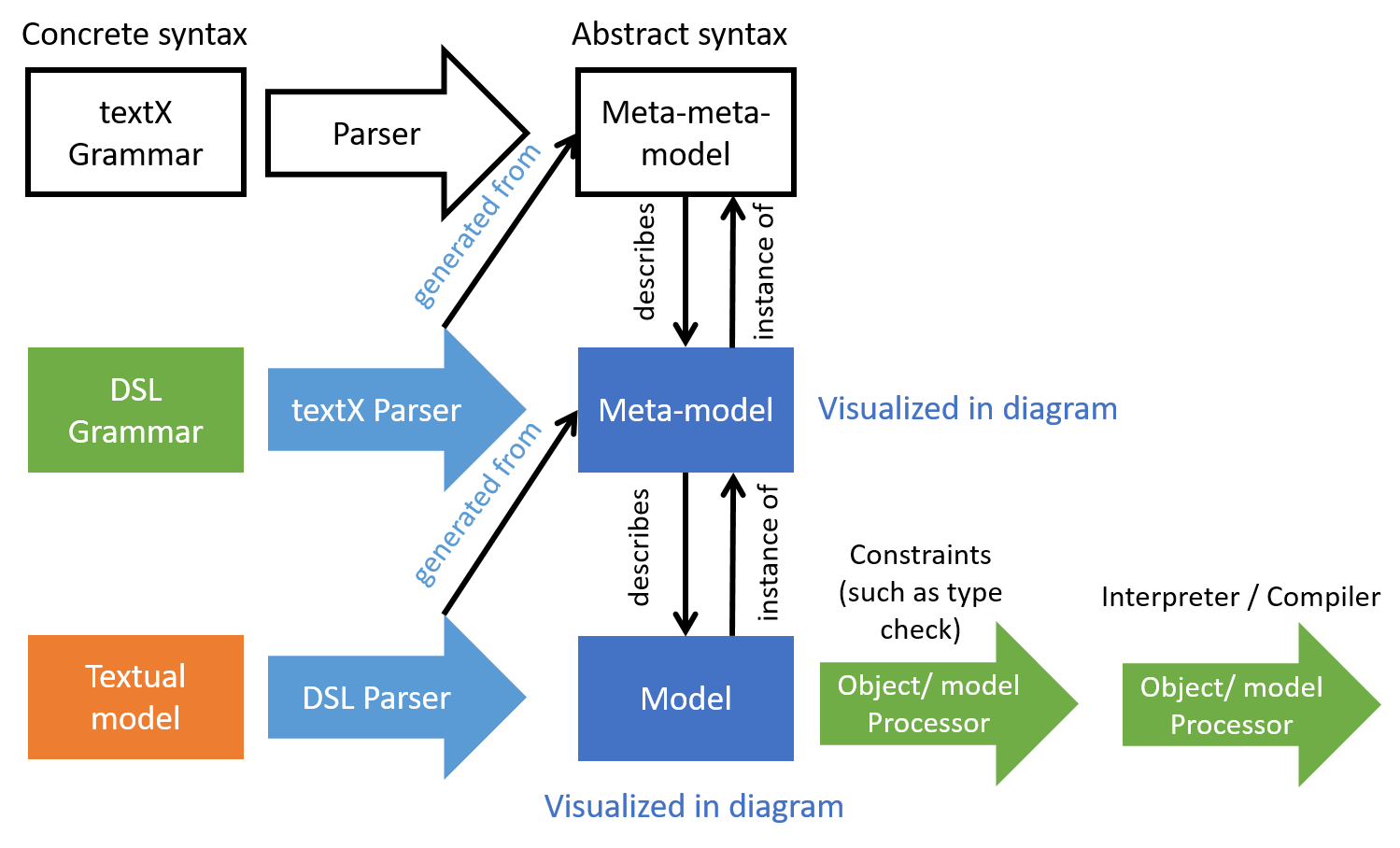
By parsing the grammar, textX creates the so-called metamodel (see Figure 1). The textX metamodel is a set of Python classes with certain relationships, for example the parent-child relationship. Another important relationship is the reference. Every common rule in the grammar gives rise to one class in the metamodel with the same name as the grammar rule. The metamodel can be visualized using the graphviz package as described here so that the metamodel classes with their attributes and relationships can be inspected.
DSL parser
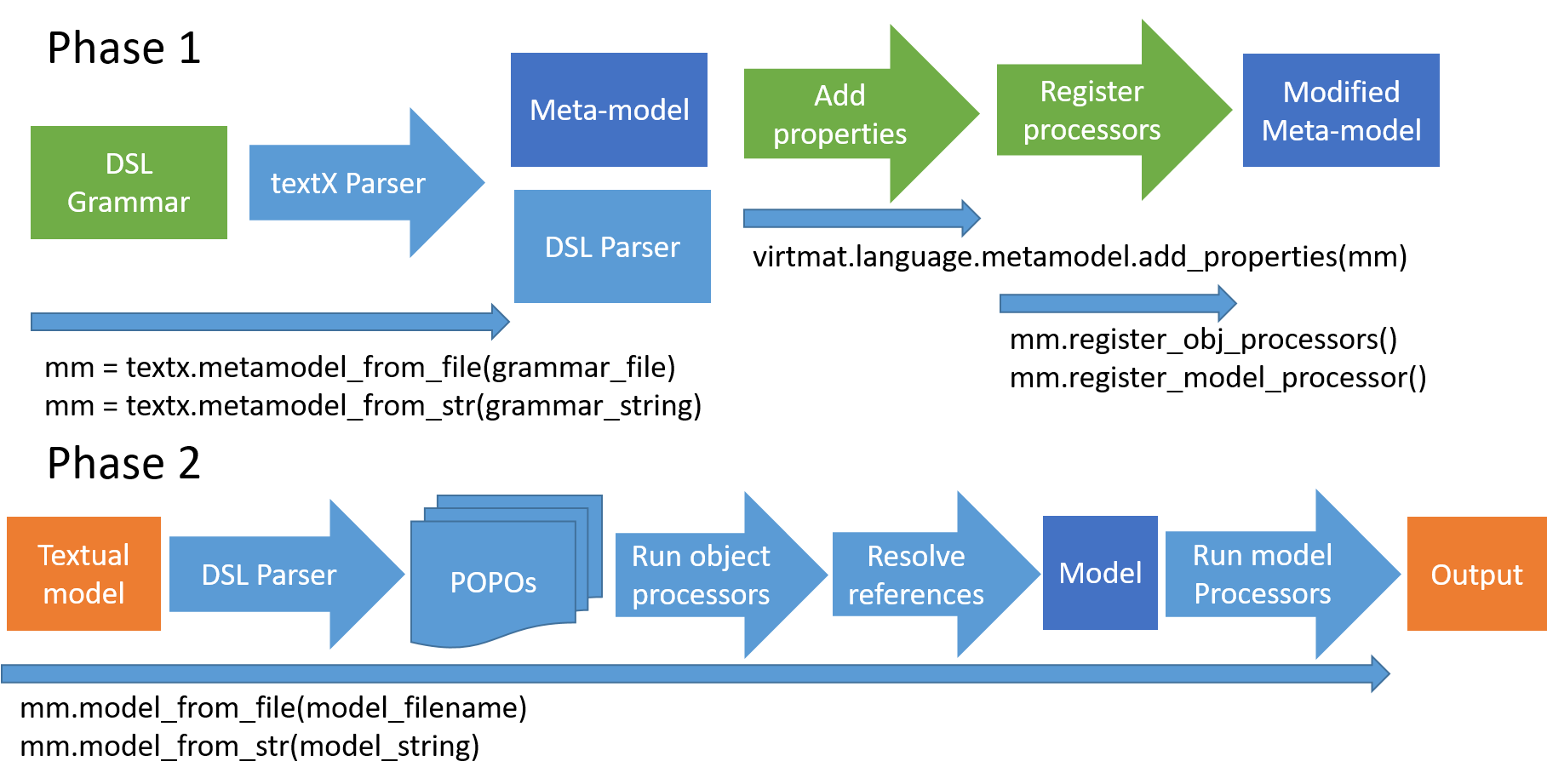
The second artifact created by parsing the grammar is the DSL parser, i.e. the code that will process a textual model written in the domain specific language. The DSL parser and the metamodel are not provided as source code but rather created in memory from the grammar on-the-fly every time a textual model is processed (see Figure 2).
Run the regression tests
Grammar extensions always require changing existing rules, e.g. extending an ordered choice rule with a newly added rule. Therefore, after checking the grammar correctness, the regression tests must be run. The regression tests are located in the top-level folder tests. The tests can be started, after changing to the test directory, with the command pytest. If any regression tests fail due to the changes in the grammar the grammar must be fixed so that all regression tests pass.
Model
The top-level folder scripts contains the script show_model.py. Using this script, the textual model is parsed and if parsing is successful, i.e. the textual model has valid syntax, then the abstract model (or simply the model) is created. In addition, a graphviz dot file is created with the same base name as the textual model file is created. This can be used to create e.g. a PDF file displaying the model, for example:
python ../scripts/show_model.py series.vm
dot -Tpdf series.dot -o series.pdf
Enrich the metamodel
The generated metamodel needs certain extensions that are used within the interpreter stage.
type_ properties
The SCL is statically typed language and for this reason every new metamodel class must have a type_ property method that evaluates and returns the Python type of a model object (instance of the metamodel class). The mapping between Python types and SCL types is provided in the internal module src/virtmat/language/utilities/types.py. If the values of the objects of newly added metamodel classes may have another type than one of the already provided types, then the type map must be extended with this new type correspondingly. If the type of an object cannot be inferred, None is returned. If the object returns no value, then NoneType is returned.
The type methods are located in the internal module src/virtmat/language/constraints/typechecks.py.
NOTE: To evaluate the type, the value property may not be used.
value properties
Every metamodel class whose objects have values (i.e. type_ property is different from NoneType) must provide a value property method. These methods are located in the internal module src/virtmat/language/interpreter/instant_executor.py.
func properties
For deferred and workflow evaluation, every class with a value property must also provide the func property method. The func property method is a Python function returning the func property that is a tuple consisting of a function returning eventually the object value (only if called) and a flat tuple of model objects whose values are used as call parameters.
The definitions of func properties are located in the internal module src/virtmat/language/interpreter/deferred_executor.py.
NOTE: Only named objects (references to variables and imported objects) are allowed as call parameters. The func property method may not use the value peroperty. In addition, the returned function (the first tuple element) may not contain object attributes or references to other model objects (self.something).
For example, if the model object of metamodel class WeightedSum has an attribute vars that is a list of variable references of scalar numeric types and wgt is a Python numeric scalar attribute (of type int or float) then the returned tuple can be defined as:
def weighted_sum_func(self):
    wgt = self.wgt  # self not allowed
    return (lambda *x: wgt*sum(x), tuple(self.vars))
metamodel['WeightedSum'].func = property(weighted_sum_func)
Object processors
The textX object processors are useful if a constraint cannot be enforced by the grammar or a class attribute cannot be set by parsing, such as default attribute values or values implied by some convention, i.e. a specification in the input is missing.
The object processor is an (optional) function that allows the processing (performing checks, adding/modifying attributes etc.) the objects of a certain metamodel class. Every object processor is registered on a per-class basis in the internal module src/virtmat/language/metamodel/processors.py and run on a per-object basis as soon as an object of the class is instantiated.
Interpreter
The interpreter is implemented as a list of textX model processors. The instant and the deferred evaluation is triggered by calling the value property of the top-level model object (named Program). The workflow evaluation is triggered by calling the model processor workflow_model_processor(metamodel).
The model processors are only called within textX automatically (in the order of registration) right after the model is fully instantiated and all object processors have run.
The only needed action in this section upon language extension is to write and register relevant object and model processors.
Constraints
The purpose of constraints is to introduce semantics into the model that is not included in the grammar. For example, a circular reference cannot be prevented by grammar or in the best case such grammar will decrease parser performance significantly due to necessary and potentially very long look-aheads. Therefore, a check for a circular reference can be done more efficiently after the parsing phase, after the whole model is completely constructed. Another type of constraint is the type constraint.
All constraints in SCL are implemented as textX model processors that are registered in the internal module src/virtmat/language/metamodel/processors.py. The individual constraint processors are located in the folder src/virtmat/language/constraints and registered in the module src/virtmat/language/constraints/processors.py. One example of such constraints is to check validity of types in check_types_processor(metamodel). Other kinds of constraints are defined in the same folder and registered in the same module.
Write serialization classes and print formatters
It can happend that for the language extension some language parameters, i.e. textX model objects with defined value property, have a new type. This new type has to be added to the internal module src/virtmat/language/utilities/types.py and mapped to the relevant Python type (class). Fo the Python class of such new type, a serialization class has to be written. The location of the serialization classes is src/virtmat/language/utilities/serializable.py. The serialization class is a subclass of the relevant Python class, that is the value type of the corresponding textX object, and of the base class FWSerializable. It provides the attribute _fw_name and implementations of the methods to_dict() and from_dict(). The to_dict() method is used to serialize the values of the relevant textX objects for use in the workflow management system or for storage in the database or in a file in JSON format. The from_dict() is used to deserialize (re-construct) the thus serialized objects. The _fw_name attribute is used for automatic recursive serialization and deserialization by the workflow management system using generic methods such as load_object().
For every new type, a print formatter has to be written. The formatter returns a string representation of the model object value matching the common rule corresponding to the metamodel class of the object. For example, the value of the model object of class Series has Series type, and is represented by the Python class pandas.Series. The value of the model object, that is a pandas.Series object is represented by the formatter in a string like (a: 1, 2, 3) and this is how the value is displayed on the screen.
Add the test inputs to the tests
The test inputs should be used to create test functions for pytest in the top-level folder tests. These tests will be run every time and ensure that the newly added features will be working after every change.
Write documentation
Write about the language extensions in the top-level docs folder.